PIXNET Logo登入

互聯網 - 大數據

跳到主文

本部落格為互聯網熱門頭條訊息管理中心

部落格全站分類:生活綜合

  • 相簿
  • 部落格
  • 留言
  • 名片
  • 3月 09 週四 201720:35
  • 分區里的inode號是0號和1號的block


文章出處
分區里的inode號是0號和1號的block
 
我相信大家在使用Linux的時候都遇到過誤刪文件系統數據的情況,不管是自己誤刪還是幫人家恢復誤刪
現在用的比較多的恢復工具大概是ext3grep 、extundelete 這兩個
當然本文不是要說這兩個工具的使用方法,而是介紹每個分區里的inode號為0或1號的block到底是什么
 
在使用ext3grep 、extundelete 的時候,基本上都會有這樣一個步驟
在Linux下可以通過“ls-id”命令來查看某分區目錄的inode值,可以輸入:
[root@localhost /]#ls –id /
2 /
[root@steven
~]# ls -id /boot
2 /boot

 
可以看到,無論是哪個分區,它的inode值都是2,而不是0,也不是1
并且當你用find命令來搜索一下0或1號inode的時候也是什么也找不到
 find / -inum 0
find: `/proc/1461/task/1461/fd/5': No such file or directory
find: `/proc/1461/task/1461/fdinfo/5': No such file or directory
find: `/proc/1461/fd/5': No such file or directory
find: `/proc/1461/fdinfo/5': No such file or directory

那么inode為0或1的block去哪里了?
 
 
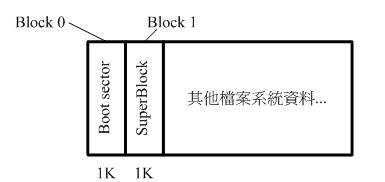
boot sector 與 superblock 的關系
block 為 1024 bytes (1K) 時:
如果 block 大小剛好是 1024 的話,那么 boot sector 與 superblock 各會占用掉一個 block , 也表示boot sector 是獨立于 superblock 外面的。
[root@www ~]# dumpe2fs /dev/hdc1
dumpe2fs
1.39 (29-May-2006)
Filesystem volume name:
/boot
....(中間省略)....
First block:
1
Block size:
1024
....(中間省略)....
Group
0: (Blocks 1-8192)
Primary superblock at
1, Group descriptors at 2-2
Reserved GDT blocks at
3-258
Block bitmap at
259 (+258), Inode bitmap at 260 (+259)
Inode table at
261-511 (+260)
511 free blocks, 1991 free inodes, 2 directories
Free blocks:
5619-6129
Free inodes:
18-2008

看到最后一個特殊字體的地方嗎? Group0 的 superblock 是由 1  號 block 開始的
上面結果可以發現 0 號 block 是保留下來留給 boot sector 用的
 
block 大于 1024 bytes (2K, 4K) 時:
如果 block 大于 1024 的話,那么 superblock 將會在 0 號!
[root@www ~]# dumpe2fs /dev/hdc2
dumpe2fs
1.39 (29-May-2006)
....(中間省略)....
Filesystem volume name:
/1
....(中間省略)....
Block size:
4096
....(中間省略)....

Group
0: (Blocks 0-32767)
Primary superblock at
0, Group descriptors at 1-1
Reserved GDT blocks at
2-626
Block bitmap at
627 (+627), Inode bitmap at 628 (+628)
Inode table at
629-1641 (+629)
0 free blocks, 32405 free inodes, 2 directories
Free blocks:
Free inodes:
12-32416

可以發現 superblock 就在第一個 block (第 0 號) 上,但是 superblock 其實就只有 1024bytes 
為了怕浪費更多空間,因此第一個 block 內就含有 boot sector 與 superblock
上面結果顯示,因為每個 block 占有 4K ,但是 superblock 其實就只有 1024bytes
因此在第一個 block 內 superblock 僅占有 1024-2047 ( 由 0 號起算的話),而 0-1023 就保留給 boot sector 來使用。
而后面的2048bytes 的空間保留
 
 
現在也明白了為什麼df命令這麼快了吧,它是讀取每個分區inode為0的superblock里面的信息,
而superblock里面就保存了分區文件系統類型、大小、已使用大小、可用大小


我們可以使用tune2fs命令查看某一分區的塊大小等信息
tune2fs -l /dev/sdb1
tune2fs
1.41.12 (17-May-2010)
Filesystem volume name:
<none>
Last mounted on:
<not available>
Filesystem UUID: 4814e6f2
-6550-4ac5-bf2d-33109fc53061
Filesystem magic number:
0xEF53
Filesystem revision #:
1 (dynamic)
Filesystem features: has_journal ext_attr resize_inode dir_index filetype needs_recovery extent flex_bg sparse_super large_file huge_file uninit_bg dir_nlink extra_isize
Filesystem flags: signed_directory_hash
Default
mount options: (none)
Filesystem state: clean
Errors behavior: Continue
Filesystem OS type: Linux
Inode count:
65280
Block count:
261048
Reserved block count:
13052
Free blocks:
252525
Free inodes:
65269
First block: 0

Block size: 4096

Fragment size:
4096
Reserved GDT blocks:
63
Blocks per group: 32768

Fragments per group:
32768
Inodes per group:
8160
Inode blocks per group:
510
Flex block group size:
16
Filesystem created: Thu Jun 2 12:23:23 2016

Last
mount time: Thu Jun 2 12:24:06 2016
Last
write time: Thu Jun 2 12:24:06 2016
Mount count:
1
Maximum
mount count: 20
Last checked: Thu Jun
2 12:23:23 2016
Check interval: 15552000 (6
months)
Next check after: Tue Nov
29 12:23:23 2016
Lifetime writes:
32 MB
Reserved blocks uid:
0 (user root)
Reserved blocks gid:
0 (group root)
First inode:
11
Inode size: 256

Required extra isize:
28
Desired extra isize:
28
Journal inode: 8

Default directory hash: half_md4
Directory Hash Seed: fad5ad24
-52ef-482c-a54b-367a5bb4f122
Journal backup: inode blocks

 
通過上面的信息就可以知道superblock是在block 0還是block 1
那么上面的信息又是從哪里讀取出來的
答案是:還是superblock
 
superblock如此重要,所以系統也對superblock做了一些保護措施
文件系統會有一些備用超級塊,備用超級塊一般創建于塊 8193、16384 或 32768
ext類文件系統會把block分成一組一組來管理簡稱為塊組,可以看到Blocks per group這一行,就是每個group都包含了32768個block
每個group都會有一個備用superblock,所以備用超級塊一般創建于塊 8193、16384 或 32768,根據格式化時的block size而定
tune2fs -l /dev/sda4 |grep group
Blocks per group: 32768
Fragments per group: 32768
Inodes per group: 8192
Inode blocks per group: 512
Flex block group size: 16
Reserved blocks gid: 0 (group root)
 
 
注意:非ext類文件系統是不能用tune2fs命令的,而且原理和內部格式跟ext類文件系統不相同!!
tune2fs -l /dev/sdb1
tune2fs
1.41.12 (17-May-2010)
tune2fs: Bad magic number
in super-block while trying to open /dev/sdb1
Couldn
't find valid filesystem superblock.


參考資料:http://bbs.chinaunix.net/forum.php?mod=viewthread&tid=4250473&extra=page%3D1%26filter%3Dauthor%26orderby%3Ddateline%26orderby%3Ddateline
EXT4是Linux kernel 自 2.6.28 開始正式支持的新的文件系統,目前已經廣泛應用在新發行的LINUX版本中。移動終端方面的Android默認系統分區也已成為EXT4。隨著LINUX系統的不斷更新,相信EXT4將很快替代EXT3,成為下一代LINUX上的標準文件系統。
相比EXT3而言,EXT4最大的改動是文件系統的空間分配模式。默認情況下,EXT4不再使用EXT3的block mapping分配方式 ,而改為Extent方式分配。從專業的數據恢復理論看,基于block mapping的EXT3在數據刪除后就很難恢復,如果基于Extent,可參考的信息就更少,如何有效的恢復EXT4誤刪除的數據,是個公認的技術難題。
近日,我公司經過不斷地嘗試和改進,終于完成了對EXT4數據誤刪除恢復的技術攻關,形成了一套完整的技術解決方案,并成功開發出了基于EXT4的專業數據恢復系統。
下面為北亞數據恢復中心對EXT4誤刪除數據的恢復方案簡介。
1、關于EXT4的結構特征:
EXT4在總體結構上與EXT3相似,大的分配方向都是基于相同大小的塊組,每個塊組內分配固定數量的INODE,可能的超級塊(或備份),及可能的塊組描述表。
EXT4的INODE 結構做了重大改變,為增加新的信息,大小由EXT3的128字節增加到默認的256字節,同時塊索引不再使用EXT3的12直接塊+1個1次間接塊+1個2次間接塊+1個3次間接塊的索引模式,而改為4個Extent片斷流,每個片斷流設定片斷的起始塊號及連續的塊數量(有可能直接指向數據區,也有可能指向索引塊區)。
2、EXT4刪除數據的結構更改:
EXT4刪除數據后,會依次釋放文件系統bitmap空間位、更新目錄結構、釋放inode空間位。而INODE空間的釋放不像WINDOWS NTFS或FAT一樣保留數據的全部或部分索引,一個更徹底的操作是直接清除所有節點中的索引項。
清除了文件的存儲索引,意味著即使可以得到文件的名稱、日期等元信息,也無法直接知道文件原來存儲在什么位置,而基于Extent的存儲方式更緊湊,刪除之后,很難保證可以很容易還原原先的存儲索引。
 
塊組是block group
block group包含備用super block,inode,block group description
INODE 結構做了重大改變,為增加新的信息,大小由EXT3的128字節增加到默認的256字節
Inode size:              256 byte
EXT4刪除數據后,會依次釋放文件系統bitmap空間位
Block bitmap at 259 (+25, Inode bitmap at 260 (+259)
 
以上內容針對于ext類文件系統,不對的地方歡迎拍磚
部分參考了鳥哥文章:http://vbird.dic.ksu.edu.tw/linux_basic/0230filesystem_6.php
(繼續閱讀...)
文章標籤

AutoPoster 發表在 痞客邦 留言(0) 人氣(12)

  • 個人分類:生活學習
▲top
  • 3月 09 週四 201720:35
  • Coping with the TCP TIME-WAIT state on busy Linux servers

文章出處
Coping with the TCP TIME-WAIT state on busy Linux servers
 
文章源自于:https://vincent.bernat.im/en/blog/2014-tcp-time-wait-state-linux.html
 

 Do not enable net.ipv4.tcp_tw_recycle.


The Linux kernel documentation is not very helpful about whatnet.ipv4.tcp_tw_recycle does:


Enable fast recycling TIME-WAIT sockets. Default value is 0. It should not be changed without advice/request of technical experts.


Its sibling, net.ipv4.tcp_tw_reuse is a little bit more documented but the language is about the same:


Allow to reuse TIME-WAIT sockets for new connections when it is safe from protocol viewpoint. Default value is 0. It should not be changed without advice/request of technical experts.


The mere result of this lack of documentation is that we find numerous tuning guides advising to set both these settings to 1 to reduce the number of entries in the TIME-WAIT state. However, as stated by tcp(7)manual page, the net.ipv4.tcp_tw_recycle option is quite problematic for public-facing servers as it won’t handle connections from two different computers behind the same NAT device, which is a problem hard to detect and waiting to bite you:


Enable fast recycling of TIME-WAIT sockets. Enabling this option is not recommended since this causes problems when working with NAT (Network Address Translation).


I will provide here a more detailed explanation in the hope to teach people who are wrong on the Internet.


xkcd illustration


xkcd: Duty Calls — Someone is wrong on the Internet


As a sidenote, despite the use of ipv4 in its name, thenet.ipv4.tcp_tw_recycle control also applies to IPv6. Also, keep in mind we are looking at the TCP stack of Linux. This is completely unrelated to Netfilter connection tracking which may be tweaked in other ways1.


  • About TIME-WAIT state

    • Purpose

    • Problems

      • Connection table slot

      • Memory

      • CPU


  • Other solutions

    • Socket lingering

    • net.ipv4.tcp_tw_reuse

    • net.ipv4.tcp_tw_recycle


  • Summary


About TIME-WAIT state


Let’s rewind a bit and have a close look at this TIME-WAIT state. What is it? See the TCP state diagram below2:


TCP state diagram


TCP state diagram


Only the end closing the connection first will reach the TIME-WAIT state. The other end will follow a path which usually permits to quickly get rid of the connection.


You can have a look at the current state of connections with ss -tan:


$ ss -tan | head -5
LISTEN 0 511 *:80 *:*
SYN-RECV 0 0 192.0.2.145:80 203.0.113.5:35449
SYN-RECV 0 0 192.0.2.145:80 203.0.113.27:53599
ESTAB 0 0 192.0.2.145:80 203.0.113.27:33605
TIME-WAIT 0 0 192.0.2.145:80 203.0.113.47:50685


Purpose


There are two purposes for the TIME-WAIT state:


  • The most known one is to prevent delayed segments from one connection being accepted by a later connection relying on the same quadruplet (source address, source port, destination address, destination port). The sequence number also needs to be in a certain range to be accepted. This narrows a bit the problem but it still exists, especially on fast connections with large receive windows. RFC 1337 explains in details what happens when the TIME-WAIT state is deficient3. Here is an example of what could be avoided if the TIME-WAIT state wasn’t shortened:


Duplicate segments accepted in another connection


Due to a shortened TIME-WAIT state, a delayed TCP segment has been accepted in an unrelated connection.


  • The other purpose is to ensure the remote end has closed the connection. When the last ACK is lost, the remote end stays in the LAST-ACK state4. Without the TIME-WAIT state, a connection could be reopened while the remote end still thinks the previous connection is valid. When it receives a SYN segment (and the sequence number matches), it will answer with a RST as it is not expecting such a segment. The new connection will be aborted with an error:


Last ACK lost


If the remote end stays in LAST-ACK state because the last ACK was lost, opening a new connection with the same quadruplet will not work.


RFC 793 requires the TIME-WAIT state to last twice the time of the MSL. On Linux, this duration is not tunable and is defined ininclude/net/tcp.h as one minute:


#define TCP_TIMEWAIT_LEN (60*HZ) /* how long to wait to destroy TIME-WAIT
* state, about 60 seconds */


There have been propositions to turn this into a tunable value but it has been refused on the ground the TIME-WAIT state is a good thing.


Problems


Now, let’s see why this state can be annoying on a server handling a lot of connections. There are three aspects of the problem:


  • the slot taken in the connection table preventing new connections of the same kind,

  • the memory occupied by the socket structure in the kernel, and

  • the additional CPU usage.


The result of ss -tan state time-wait | wc -l is not a problem per se!


Connection table slot


A connection in the TIME-WAIT state is kept for one minute in the connection table. This means, another connection with the samequadruplet (source address, source port, destination address, destination port) cannot exist.


For a web server, the destination address and the destination port are likely to be constant. If your web server is behind a L7 load-balancer, the source address will also be constant. On Linux, the client port is by default allocated in a port range of about 30,000 ports (this can be changed by tuning net.ipv4.ip_local_port_range). This means that only 30,000 connections can be established between the web server and the load-balancer every minute, so about 500 connections per second.


If the TIME-WAIT sockets are on the client side, such a situation is easy to detect. The call to connect() will return EADDRNOTAVAIL and the application will log some error message about that. On the server side, this is more complex as there is no log and no counter to rely on. In doubt, you should just try to come with something sensible to list the number of used quadruplets:


$ ss -tan 'sport = :80' | awk '{print $(NF)" "$(NF-1)}' | \
> sed 's/:[^ ]*//g' | sort | uniq -c
696 10.24.2.30 10.33.1.64
1881 10.24.2.30 10.33.1.65
5314 10.24.2.30 10.33.1.66
5293 10.24.2.30 10.33.1.67
3387 10.24.2.30 10.33.1.68
2663 10.24.2.30 10.33.1.69
1129 10.24.2.30 10.33.1.70
10536 10.24.2.30 10.33.1.73


The solution is more quadruplets5. This can be done in several ways (in the order of difficulty to setup):


  • use more client ports by setting net.ipv4.ip_local_port_range to a wider range,

  • use more server ports by asking the web server to listen to several additional ports (81, 82, 83, …),

  • use more client IP by configuring additional IP on the load balancer and use them in a round-robin fashion,

  • use more server IP by configuring additional IP on the web server6.


Of course, a last solution is to tweak net.ipv4.tcp_tw_reuse andnet.ipv4.tcp_tw_recycle. Don’t do that yet, we will cover those settings later.


Memory


With many connections to handle, leaving a socket open for one additional minute may cost your server some memory. For example, if you want to handle about 10,000 new connections per second, you will have about 600,000 sockets in the TIME-WAIT state. How much memory does it represent? Not that much!


First, from the application point of view, a TIME-WAIT socket does not consume any memory: the socket has been closed. In the kernel, aTIME-WAIT socket is present in three structures (for three different purposes):


  1. A hash table of connections, named the “TCP established hash table” (despite containing connections in other states) is used to locate an existing connection, for example when receiving a new segment.


    Each bucket of this hash table contains both a list of connections in the TIME-WAIT state and a list of regular active connections. The size of the hash table depends on the system memory and is printed at boot:


    $ dmesg | grep "TCP established hash table"
    [ 0.169348] TCP established hash table entries: 65536 (order: 8, 1048576 bytes)


    It is possible to override it by specifying the number of entries on the kernel command line with the thash_entries parameter.


    Each element of the list of connections in the TIME-WAIT state is astruct tcp_timewait_sock, while the type for other states is struct tcp_sock7:


    struct tcp_timewait_sock {
    struct inet_timewait_sock tw_sk;
    u32 tw_rcv_nxt;
    u32 tw_snd_nxt;
    u32 tw_rcv_wnd;
    u32 tw_ts_offset;
    u32 tw_ts_recent;
    long tw_ts_recent_stamp;
    };
    struct inet_timewait_sock {
    struct sock_common __tw_common;
    int tw_timeout;
    volatile unsigned char tw_substate;
    unsigned char tw_rcv_wscale;
    __be16 tw_sport;
    unsigned int tw_ipv6only : 1,
    tw_transparent : 1,
    tw_pad : 6,
    tw_tos : 8,
    tw_ipv6_offset : 16;
    unsigned long tw_ttd;
    struct inet_bind_bucket *tw_tb;
    struct hlist_node tw_death_node;
    };


  2. A set of lists of connections, called the “death row”, is used to expire the connections in the TIME-WAIT state. They are ordered by how much time left before expiration.


    It uses the same memory space as for the entries in the hash table of connections. This is the struct hlist_node tw_death_nodemember of struct inet_timewait_sock8.


  3. A hash table of bound ports, holding the locally bound ports and the associated parameters, is used to determine if it is safe to listen to a given port or to find a free port in the case of dynamic bind. The size of this hash table is the same as the size of the hash table of connections:


    $ dmesg | grep "TCP bind hash table"
    [ 0.169962] TCP bind hash table entries: 65536 (order: 8, 1048576 bytes)


    Each element is a struct inet_bind_socket. There is one element for each locally bound port. A TIME-WAIT connection to a web server is locally bound to the port 80 and shares the same entry as its sibling TIME-WAIT connections. On the other hand, a connection to a remote service is locally bound to some random port and does not share its entry.


So, we are only concerned by the space occupied by struct tcp_timewait_sock and struct inet_bind_socket. There is one struct tcp_timewait_sock for each connection in the TIME-WAIT state, inbound or outbound. There is one dedicated struct inet_bind_socket for each outbound connection and none for an inbound connection.


A struct tcp_timewait_sock is only 168 bytes while a struct inet_bind_socket is 48 bytes:


$ sudo apt-get install linux-image-$(uname -r)-dbg
[...]
$ gdb /usr/lib/debug/boot/vmlinux-$(uname -r)
(gdb) print sizeof(struct tcp_timewait_sock)
$1 = 168
(gdb) print sizeof(struct tcp_sock)
$2 = 1776
(gdb) print sizeof(struct inet_bind_bucket)
$3 = 48


So, if you have about 40,000 inbound connections in the TIME-WAITstate, it should eat less than 10MB of memory. If you have about 40,000 outbound connections in the TIME-WAIT state, you need to account for 2.5MB of additional memory. Let’s check that by looking at the output of slabtop. Here is the result on a server with about 50,000 connections in the TIME-WAIT state, 45,000 of which are outbound connections:


$ sudo slabtop -o | grep -E '(^ OBJS|tw_sock_TCP|tcp_bind_bucket)'
OBJS ACTIVE USE OBJ SIZE SLABS OBJ/SLAB CACHE SIZE NAME
50955 49725 97% 0.25K 3397 15 13588K tw_sock_TCP
44840 36556 81% 0.06K 760 59 3040K tcp_bind_bucket


There is nothing to change here: the memory used by TIME-WAITconnections is really small. If your server need to handle thousands of new connections per second, you need far more memory to be able to efficiently push data to clients. The overhead of TIME-WAIT connections is negligible.


CPU


On the CPU side, searching for a free local port can be a bit expensive. The work is done by the inet_csk_get_port() function which uses a lock and iterate on locally bound ports until a free port is found. A large number of entries in this hash table is usually not a problem if you have a lot of outbound connections in the TIME-WAIT state (like ephemeral connections to a memcached server): the connections usually share the same profile, the function will quickly find a free port as it iterates on them sequentially.


Other solutions


If you still think you have a problem with TIME-WAIT connections after reading the previous section, there are three additional solutions to solve them:


  • disable socket lingering,

  • net.ipv4.tcp_tw_reuse, and

  • net.ipv4.tcp_tw_recycle.


Socket lingering


When close() is called, any remaining data in the kernel buffers will be sent in the background and the socket will eventually transition to theTIME-WAIT state. The application can continue to work immediatly and assume that all data will eventually be safely delivered.


However, an application can choose to disable this behaviour, known assocket lingering. There are two flavors:


  1. In the first one, any remaining data will be discarded and instead of closing the connection with the normal four-packet connection termination sequence, the connection will be closed with a RST(and therefore, the peer will detect an error) and will be immediatly destroyed. No TIME-WAIT state in this case.


  2. With the second flavor, if there is any data still remaining in the socket send buffer, the process will sleep when calling close()until either all the data is sent and acknowledged by the peer or the configured linger timer expires. It is possible for a process to not sleep by setting the socket as non-blocking. In this case, the same process happens in the background. It permits the remaining data to be sent during a configured timeout but if the data is succesfully sent, the normal close sequence is run and you get aTIME-WAIT state. And on the other case, you’ll get the connection close with a RST and the remaining data is discarded.


In both cases, disabling socket lingering is not a one-size-fits-all solution. It may be used by some applications like HAProxy or Nginx when it is safe to use from the upper protocol point of view. There are good reasons to not disable it unconditionnaly.


net.ipv4.tcp_tw_reuse


The TIME-WAIT state prevents delayed segments to be accepted in an unrelated connection. However, on certain conditions, it is possible to assume a new connection’s segment cannot be misinterpreted with an old connection’s segment.


RFC 1323 presents a set of TCP extensions to improve performance over high-bandwidth paths. Among other things, it defines a new TCP option carrying two four-byte timestamp fields. The first one is the current value of the timestamp clock of the TCP sending the option while the second one is the most recent timestamp received from the remote host.


By enabling net.ipv4.tcp_tw_reuse, Linux will reuse an existing connection in the TIME-WAIT state for a new outgoing connection if the new timestamp is strictly bigger than the most recent timestamp recorded for the previous connection: an outgoing connection in theTIME-WAIT state can be reused after just one second.


How is it safe? The first purpose of the TIME-WAIT state was to avoid duplicate segments to be accepted in an unrelated connection. Thanks to the use of timestamps, such a duplicate segments will come with an outdated timestamp and therefore be discarded.


The second purpose was to ensure the remote end is not in the LAST-ACK state because of the lost of the last ACK. The remote end will retransmit the FIN segment until:


  1. it gives up (and tear down the connection), or

  2. it receives the ACK it is waiting (and tear down the connection), or

  3. it receives a RST (and tear down the connection).


If the FIN segments are received in a timely manner, the local end socket will still be in the TIME-WAIT state and the expected ACKsegments will be sent.


Once a new connection replaces the TIME-WAIT entry, the SYN segment of the new connection is ignored (thanks to the timestamps) and won’t be answered by a RST but only by a retransmission of the FIN segment. The FIN segment will then be answered with a RST (because the local connection is in the SYN-SENT state) which will allow the transition out of the LAST-ACK state. The initial SYN segment will eventually be resent (after one second) because there was no answer and the connection will be established without apparent error, except a slight delay:


Last ACK lost and timewait reuse


If the remote end stays in LAST-ACK state because the last ACK was lost, the remote connection will be reset when the local end transition to the SYN-SENT state.


It should be noted that when a connection is reused, the TWRecycledcounter is increased (despite its name).


net.ipv4.tcp_tw_recycle


This mechanism also relies on the timestamp option but affects both incoming and outgoing connections which is handy when the server usually closes the connection first9.


The TIME-WAIT state is scheduled to expire sooner: it will be removed after the retransmission timeout (RTO) interval which is computed from the RTT and its variance. You can spot the appropriate values for a living connection with the ss command:


$ ss --info sport = :2112 dport = :4057
State Recv-Q Send-Q Local Address:Port Peer Address:Port
ESTAB 0 1831936 10.47.0.113:2112 10.65.1.42:4057
cubic wscale:7,7 rto:564 rtt:352.5/4 ato:40 cwnd:386 ssthresh:200 send 4.5Mbps rcv_space:5792


To keep the same guarantees the TIME-WAIT state was providing, while reducing the expiration timer, when a connection enters the TIME-WAITstate, the latest timestamp is remembered in a dedicated structure containing various metrics for previous known destinations. Then, Linux will drop any segment from the remote host whose timestamp is not strictly bigger than the latest recorded timestamp, unless the TIME-WAITstate would have expired:


if (tmp_opt.saw_tstamp &&
tcp_death_row.sysctl_tw_recycle &&
(dst = inet_csk_route_req(sk, &fl4, req, want_cookie)) != NULL &&
fl4.daddr == saddr &&
(peer = rt_get_peer((struct rtable *)dst, fl4.daddr)) != NULL) {
inet_peer_refcheck(peer);
if ((u32)get_seconds() - peer->tcp_ts_stamp < TCP_PAWS_MSL &&
(s32)(peer->tcp_ts - req->ts_recent) >
TCP_PAWS_WINDOW) {
NET_INC_STATS_BH(sock_net(sk), LINUX_MIB_PAWSPASSIVEREJECTED);
goto drop_and_release;
}
}


When the remote host is in fact a NAT device, the condition on timestamps will forbid allof the hosts except one behind the NAT device to connect during one minute because they do not share the same timestamp clock. In doubt, this is far better to disable this option since it leads to difficult to detect and difficult to diagnose problems.


The LAST-ACK state is handled in the exact same way as fornet.ipv4.tcp_tw_recycle.


Summary


The universal solution is to increase the number of possible quadruplets by using, for example, more server ports. This will allow you to not exhaust the possible connections with TIME-WAIT entries.


On the server side, do not enable net.ipv4.tcp_tw_recycle unless you are pretty sure you will never have NAT devices in the mix. Enablingnet.ipv4.tcp_tw_reuse is useless for incoming connections.


On the client side, enabling net.ipv4.tcp_tw_reuse is another almost-safe solution. Enabling net.ipv4.tcp_tw_recycle in addition tonet.ipv4.tcp_tw_reuse is mostly useless.


Moreover, when designing protocols, don’t let clients close first. Clients won’t have to deal with the TIME-WAIT state pushing the responsability to servers which are better suited to handle this.


And a final quote by W. Richard Stevens, in Unix Network Programming:


The TIME_WAIT state is our friend and is there to help us (i.e., to let old duplicate segments expire in the network). Instead of trying to avoid the state, we should understand it.


  1. Notably, fiddling with net.netfilter.nf_conntrack_tcp_timeout_time_wait won’t change anything on how the TCP stack will handle the TIME-WAIT state. ↩


  2. This diagram is licensed under the LaTeX Project Public License 1.3. The original file is available on this page. ↩


  3. The first work-around proposed in RFC 1337 is to ignore RST segments in the TIME-WAIT state. This behaviour is controlled by net.ipv4.rfc1337 which is not enabled by default on Linux because this is not a complete solution to the problem described in the RFC. ↩


  4. While in the LAST-ACK state, a connection will retransmit the last FIN segment until it gets the expected ACK segment. Therfore, it is unlikely we stay long in this state. ↩


  5. On the client side, older kernels also have to find a free local tuple (source address and source port) for each outgoing connection. Increasing the number of server ports or IPwon’t help in this case. Linux 3.2 is recent enough to be able to share the same local tuple for different destinations. Thanks to Willy Tarreau for his insight on this aspect. ↩


  6. This last solution may seem a bit dumb since you could just use more ports but some servers are not able to be configured this way. The before last solution can also be quite cumbersome to setup, depending on the load-balancing software, but uses less IPthan the last solution. ↩


  7. The use of a dedicated memory structure for sockets in the TIME-WAIT is here since Linux 2.6.14. The struct sock_common structure is a bit more verbose and I won’t copy it here. ↩


  8. Since Linux 4.1, the way TIME-WAIT sockets are tracked has been modified to increase performance and parallelism. The death row is now just a hash table. ↩


  9. When the server closes the connection first, it gets the TIME-WAIT state while the client will consider the corresponding quadruplet free and hence may reuse it for a new connection. ↩


建議將這兩個內核參數設置為0
net.ipv4.tcp_tw_recycle = 0

net.ipv4.tcp_tw_reuse = 0


參考文章:


TCP 的那些事兒(上)
http://coolshell.cn/articles/11564.html


TCP 的那些事兒(下)
http://coolshell.cn/articles/11609.html


Nagle算法默認是打開的,所以,對于一些需要小包場景的程序——比如像telnet或ssh這樣的交互性比較強的程序,你需要關閉這個算法。你可以在Socket設置TCP_NODELAY選項來關閉這個算法(關閉Nagle算法沒有全局參數,需要根據每個應用自己的特點來關閉)


setsockopt(sock_fd, IPPROTO_TCP, TCP_NODELAY, (char *)&value,sizeof(int));
另外,網上有些文章說TCP_CORK的socket option是也關閉Nagle算法,這個還不夠準確。TCP_CORK是禁止小包發送,而Nagle算法沒有禁止小包發送,只是禁止了大量的小包發送。最好不要兩個選項都設置。 老實說,我覺得Nagle算法其實只加了個延時,沒有別的什么,我覺得最好還是把他關閉,然后由自己的應用層來控制數據,我個覺得不應該什么事都去依賴內核算法


xshell


http://mp.weixin.qq.com/s?__biz=MjM5NTU2MTQwNA==&mid=2650652755&idx=1&sn=be3c509602233fa2804121ff97ed934e&scene=0#wechat_redirect


這個問題在網上已經有很多人討論過了,再談這個問題,只是根據我處理過的相關業務來談談我的看法。至于什么是TIMEWAIT,我想,并不需要多說。
TIMEWAIT狀態本身和應用層的客戶端或者服務器是沒有關系的。僅僅是主動關閉的一方,在使用FIN|ACK|FIN|ACK四分組正常關閉TCP連接的時候會出現這個TIMEWAIT。服務器在處理客戶端請求的時候,如果你的程序設計為服務器主動關閉,那么你才有可能需要關注這個TIMEWAIT狀態過多的問題。如果你的服務器設計為被動關閉,那么你首先要關注的是CLOSE_WAIT。
原則
TIMEWAIT并不是多余的。在TCP協議被創造,經歷了大量的實際場景實踐之后,TIMEWAIT出現了,因為TCP主動關閉連接的一方需要TIMEWAIT狀態,它是我們的朋友。這是《UNIX網絡編程》的作者----Steven對TIMEWAIT的態度。
TIMEWAIT是友好的
TCP要保證在所有可能的情況下使得所有的數據都能夠被正確送達。當你關閉一個socket時,主動關閉一端的socket將進入TIME_WAIT狀態,而被動關閉一方則轉入CLOSED狀態,這的確能夠保證所有的數據都被傳輸。當一個socket關閉的時候,是通過兩端四次握手完成的,當一端調用close()時,就說明本端沒有數據要發送了。這好似看來在握手完成以后,socket就都可以處于初始的CLOSED狀態了,其實不然。原因是這樣安排狀態有兩個問題, 首先,我們沒有任何機制保證最后的一個ACK能夠正常傳輸,第二,網絡上仍然有可能有殘余的數據包(wandering duplicates),我們也必須能夠正常處理。
TIMEWAIT就是為了解決這兩個問題而生的。
1.假設最后一個ACK丟失了,被動關閉一方會重發它的FIN。主動關閉一方必須維持一個有效狀態信息(TIMEWAIT狀態下維持),以便能夠重發ACK。如果主動關閉的socket不維持這種狀態而進入CLOSED狀態,那么主動關閉的socket在處于CLOSED狀態時,接收到FIN后將會響應一個RST。被動關閉一方接收到RST后會認為出錯了。如果TCP協議想要正常完成必要的操作而終止雙方的數據流傳輸,就必須完全正確的傳輸四次握手的四個節,不能有任何的丟失。這就是為什么socket在關閉后,仍然處于TIME_WAIT狀態的第一個原因,因為他要等待以便重發ACK。
2.假設目前連接的通信雙方都已經調用了close(),雙方同時進入CLOSED的終結狀態,而沒有走TIME_WAIT狀態。會出現如下問題,現在有一個新的連接被建立起來,使用的IP地址與端口與先前的完全相同,后建立的連接是原先連接的一個完全復用。還假定原先的連接中有數據報殘存于網絡之中,這樣新的連接收到的數據報中有可能是先前連接的數據報。為了防止這一點,TCP不允許新連接復用TIME_WAIT狀態下的socket。處于TIME_WAIT狀態的socket在等待兩倍的MSL時間以后(之所以是兩倍的MSL,是由于MSL是一個數據報在網絡中單向發出到認定丟失的時間,一個數據報有可能在發送途中或是其響應過程中成為殘余數據報,確認一個數據報及其響應的丟棄的需要兩倍的MSL),將會轉變為CLOSED狀態。這就意味著,一個成功建立的連接,必然使得先前網絡中殘余的數據報都丟失了。
大量TIMEWAIT在某些場景中導致令人頭疼的業務問題
大量TIMEWAIT出現,并且需要解決的場景。
      
在高并發短連接的TCP服務器上,當服務器處理完請求后立刻按照主動正常關閉連接。。。這個場景下,會出現大量socket處于TIMEWAIT狀態。如果客戶端的并發量持續很高,此時部分客戶端就會顯示連接不上。
我來解釋下這個場景。主動正常關閉TCP連接,都會出現TIMEWAIT。為什么我們要關注這個高并發短連接呢?有兩個方面需要注意:
1.高并發可以讓服務器在短時間范圍內同時占用大量端口,而端口有個0~65535的范圍,并不是很多,刨除系統和其他服務要用的,剩下的就更少了。
2.在這個場景中,短連接表示“業務處理+傳輸數據的時間 遠遠小于 TIMEWAIT超時的時間”的連接。這里有個相對長短的概念,比如,取一個web頁面,1秒鐘的http短連接處理完業務,在關閉連接之后,這個業務用過的端口會停留在TIMEWAIT狀態幾分鐘,而這幾分鐘,其他HTTP請求來臨的時候是無法占用此端口的。單用這個業務計算服務器的利用率會發現,服務器干正經事的時間和端口(資源)被掛著無法被使用的時間的比例是 1:幾百,服務器資源嚴重浪費。(說個題外話,從這個意義出發來考慮服務器性能調優的話,長連接業務的服務就不需要考慮TIMEWAIT狀態。同時,假如你對服務器業務場景非常熟悉,你會發現,在實際業務場景中,一般長連接對應的業務的并發量并不會很高)
綜合這兩個方面,持續的到達一定量的高并發短連接,會使服務器因端口資源不足而拒絕為一部分客戶服務。同時,這些端口都是服務器臨時分配,無法用SO_REUSEADDR選項解決這個問題。
一對矛盾
TIMEWAIT既友好,又令人頭疼。
但是我們還是要抱著一個友好的態度來看待它,因為它盡它的能力保證了服務器的健壯性。
可行而且必須存在,但是不符合原則的解決方式
1.linux沒有在sysctl或者proc文件系統暴露修改這個TIMEWAIT超時時間的接口,可以修改內核協議棧代碼中關于這個TIMEWAIT的超時時間參數,重編內核,讓它縮短超時時間,加快回收;
 
2.利用SO_LINGER選項的強制關閉方式,發RST而不是FIN,來越過TIMEWAIT狀態,直接進入CLOSED狀態。詳見我的博文《TCP之選項SO_LINGER》。
我如何看待這個問題
為什么說上述兩種解決方式我覺得可行,但是不符合原則?
我首先認為,我要依靠TIMEWAIT狀態來保證我的服務器程序健壯,網絡上發生的亂七八糟的問題太多了,我先要服務功能正常。


(繼續閱讀...)
文章標籤

AutoPoster 發表在 痞客邦 留言(0) 人氣(61)

  • 個人分類:生活學習
▲top
  • 3月 09 週四 201720:34
  • 安裝SQL Server2016正式版


文章出處
安裝SQL Server2016正式版
 
今天終于有時間安裝SQL Server2016正式版,下載那個安裝包都用了一個星期
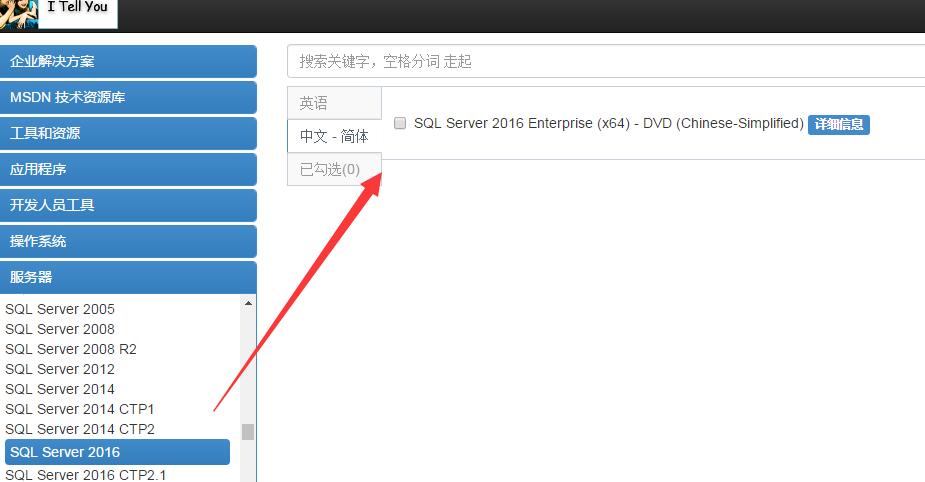
安裝包可以從這里下載:
http://www.itellyou.cn/
https://msdn.microsoft.com/zh-cn/subscriptions/downloads/hh442898.aspx
 
安裝環境
hyper-v虛擬機
Windows2012R2數據中心版


打開安裝包可以看到現在SQL 引擎功能和SSMS已經獨立分開安裝了
只支持64位
 
功能選擇里多出來的R Server,但是R Server需要聯網或者自己下載下來,這是坑爹的地方之一,它沒有集成在SQL Server2016安裝包里
 
 
服務器配置這里添加了“執行卷維護任務” 特權,建議勾選,以前需要在組策略管理器里設置的,方便了很多
而啟動板應該是計算機首次連接到服務器時安裝到計算機上的一個小應用程序。通過快速啟動板,經過身份驗證的用戶可以訪問 SQL Server 的主要功能
 
另一個改進是Tempdb的設置更加人性化了,提供了很多選項
 
如前面所述,R Server需要聯網下載或者自己單獨下載
 
開始安裝,SQL Server2016需要最新的.NET4.6
 
 
我從電腦時間上看,安裝時間從11:35到11:48 ,大概用了13分鐘
安裝好之后的SQL服務


安裝完之后別忘了還需要安裝SSMS,這是坑爹的地方之二,干嘛不集成到SQL Server安裝包里還要用戶自己單獨下載
下載地址:https://msdn.microsoft.com/en-us/library/mt238290.aspx?f=255&MSPPError=-2147217396
由于SSMS是基于VS2015的獨立shell,所以安裝界面跟VS的安裝界面幾乎一樣
 
 
具體版本
select @@version
Microsoft SQL Server
2016 (RTM) - 13.0.1601.5 (X64) Apr 29 2016 23:23:58 Copyright (c) Microsoft Corporation Enterprise Edition (64-bit) on Windows Server 2012 R2 Datacenter 6.3 <X64> (Build 9600: ) (Hypervisor)

 
(繼續閱讀...)
文章標籤

AutoPoster 發表在 痞客邦 留言(0) 人氣(9)

  • 個人分類:生活學習
▲top
  • 3月 09 週四 201720:34
  • SQLPrompt 7.2發布


文章出處
SQLPrompt 7.2發布 
 
下載地址:http://www.red-gate.com/products/sql-development/sql-prompt/
 
紅門的熱門產品SQLPrompt 發布了最新版本7.2,已經支持SQL Server2016


關鍵字高亮更加人性化
新功能亮點,當執行update/delete的時候沒有加where它可以提示您沒有加where條件而且并不會執行
 
 
新功能亮點,生成insert腳本
按右鍵
并且在要轉義的特殊符號前自動加轉義符'


注冊碼生成器:http://files.cnblogs.com/files/lyhabc/SQL.Prompt.Keygen.7.2.rar
 
(繼續閱讀...)
文章標籤

AutoPoster 發表在 痞客邦 留言(0) 人氣(12)

  • 個人分類:生活學習
▲top
  • 3月 09 週四 201720:34
  • 生成1到300個數字的方法


文章出處
生成1到300個數字的方法
 
方法一
cross join
SELECT aa.[num]+bb.[num]+cc.[num] FROM 
(
SELECT 0 num UNION ALL
SELECT 1 num UNION ALL
SELECT 2 num UNION ALL
SELECT 3 num UNION ALL
SELECT 4 num UNION ALL
SELECT 5 num UNION ALL
SELECT 6 num UNION ALL
SELECT 7 num UNION ALL
SELECT 8 num UNION ALL
SELECT 9 num ) aa
CROSS JOIN
(
SELECT 0 num UNION ALL
SELECT 10 num UNION ALL
SELECT 20 num UNION ALL
SELECT 30 num UNION ALL
SELECT 40 num UNION ALL
SELECT 50 num UNION ALL
SELECT 60 num UNION ALL
SELECT 70 num UNION ALL
SELECT 80 num UNION ALL
SELECT 90 num ) bb
CROSS JOIN
(
SELECT 0 num UNION ALL
SELECT 100num UNION ALL
SELECT 200 num ) cc
ORDER BY 1


方法二
while循環
DECLARE @i INT
DECLARE @tb TABLE(a INT)
SET @i=1
INSERT INTO @tb
(
[a] )
VALUES ( @i -- a - int
)
WHILE (@i<300)
BEGIN
SET @i=@i+1
INSERT INTO @tb
(
[a] )
VALUES ( @i -- a - int
)
END
SELECT * FROM @tb

 
方法三
CTE遞歸
;with cte_temp
as
(
select 0 as id
union all
select id+1 from cte_temp where id<301
)
select id from cte_temp option (maxrecursion 301);

 
(繼續閱讀...)
文章標籤

AutoPoster 發表在 痞客邦 留言(0) 人氣(11)

  • 個人分類:生活學習
▲top
  • 3月 09 週四 201720:34
  • SQL Server2014 SP2關鍵特性


文章出處
SQL Server2014 SP2關鍵特性
 
轉載自:https://blogs.msdn.microsoft.com/sqlreleaseservices/sql-2014-service-pack-2-is-now-available/
 
根據SQL Server客戶的和SQL社區的反饋,SQL2014 SP2補丁包包含了超過20個改進,包括性能,擴展性,和診斷功能
性能和擴展性改進
自動軟numa分區 :需要在sqlserver啟動參數里添加 Trace Flag 8079 來打開這個功能,這也是SQL2016的新功能
DBCC CHECK* 系列命令可以使用MAXDOP查詢提示:使用局部配置而不是全局配置的sp_configure 值來控制DBCC CHECK* 的并行度
buffer pool可以利用8TB內存:通過128TB的虛擬地址空間,SQL Server的buffer pool可以利用到8TB內存的buffer pool
SOS_RWLock 自旋鎖增強:SOS_RWLock 是一個同步原語并且在SQL Server的代碼庫里的很多地方都有使用。
Spatial Native 實現:這個功能已經在SQL 2012 SP3 已經有所介紹(KB3107399)
支持和診斷改進
數據庫克隆:克隆數據庫是一個新的DBCC 命令,允許微軟的CSS團隊對已存在的生產環境數據庫進行架構和元數據的克隆方便troubshooting,克隆的數據庫不應在生產環境使用
命令語法
DBCC clonedatabase(‘source_database_name’, ‘clone_database_name’).
select DATABASEPROPERTYEX(‘clonedb’, ‘isClone’). --查看一個數據庫是否是克隆數據庫
Tempdb支持增強:在SQL Server啟動時會指示tempdb的文件數和不同tempdb數據文件的大小
數據庫即時文件初始化打log:在SQL Server啟動時會指示即時文件初始化是否已經啟用
調用堆棧模塊名:擴展事件調用堆棧已經包含模塊名+偏移代替原來的絕對地址
新的增長統計信息DMF:新增了一個DMF來查看分區表里新增的統計信息, sys.dm_db_incremental_stats_properties
索引使用率相關DMV行為更新:重建索引將不會清除 sys.dm_db_index_usage_stats里的行信息
擴展事件和DMV之間關聯:Query_hash和query_plan_hash 用來指示一個獨立的查詢。在DMV 里,它們的數據類型是varbinary(8)而在擴展事件里,它們的數據類型是UINT64. 因為SQL Server沒有“unsigned bigint”類型, 所以在擴展事件里的action/filter 列將query_hash 和query_plan_hash 的數據類型改為INT64 這樣能很好把擴展事件和DMV做對接.
BULK INSERT和BCP 支持UTF-8 類型數據:無論導入還是導出數據都支持UTF-8字符集.
運算符查詢計劃profiling:在查詢計劃里添加了在一個執行計劃里每個運算符的CPU, I/O Reads, elapsed time per-thread等信息,同樣在擴展事件里添加了query_thread_profile來輔助troubleshooting
更改跟蹤內部表清除存儲過程:增加了sp_flush_CT_internal_table_on_demand 存儲過程來按需清除更改跟蹤的內部表
AlwaysON租期超時打log:對超時時間和renew時間進行打log
新的DMF代替DBCC INPUTBUFFER:接收一個會話/請求的 input buffer ,sys.dm_exec_input_buffer,這也是SQL2016的新功能
新增的查詢內存授予調控:資源調控器通過 MIN_GRANT_PERCENT 和 MAX_GRANT_PERCENT (KB3107401)平衡查詢的內存授予防止內存爭用
內存授予/使用診斷增強:一個新的擴展事件query_memory_grant_usage跟蹤內存請求和授予。
tempdb溢出的查詢執行診斷:新增hash_spill_details 擴展事件并添加了Hash Warning 和 Sort Warnings 列
AlwaysON擴展事件和性能計數器診斷延遲:新增擴展事件和性能計數器來更好的診斷AlwaysON的同步延遲。
事務復制中發布端允許DROP表 DDL語句:新增了allow_drop屬性,當設置為TRUE,那么可以drop掉發布端的表
查詢執行計劃中對謂詞下推的改進:通過條件下推,在執行過程中盡早減少數據訪問量,能顯著提高性能。residual predicate pushdown 跟MySQL5.6里面的ICP index condition pushdown類似,這也是SQL2016的新功能 ,相關文章(https://www.brentozar.com/archive/2015/12/improved-diagnostics-for-query-execution-plans-that-involve-residual-predicate-pushdown/
https://support.microsoft.com/en-us/kb/3107397
http://www.cnblogs.com/MYSQLZOUQI/p/5695718.html)
 
本文版權歸作者所有,未經作者同意不得轉載。
(繼續閱讀...)
文章標籤

AutoPoster 發表在 痞客邦 留言(0) 人氣(11)

  • 個人分類:生活學習
▲top
  • 3月 09 週四 201720:34
  • ola.hallengren的SQL Server維護腳本


文章出處
ola.hallengren的SQL Server維護腳本
 
下載地址
http://files.cnblogs.com/files/lyhabc/ola.hallengrenMaintenanceSolution.rar
(繼續閱讀...)
文章標籤

AutoPoster 發表在 痞客邦 留言(0) 人氣(82)

  • 個人分類:生活學習
▲top
  • 3月 09 週四 201720:34
  • KVM安裝部署


文章出處
KVM安裝部署
 
公司開始部署KVM,KVM的全稱是kernel base virtual machine,對KVM虛擬化技術研究了一段時間,
KVM是基于硬件的完全虛擬化,跟vmware、xen、hyper-v是同一個級別的,而且已經內置在Linux內核
而且KVM是開源產品,最新的虛擬化技術都會優先應用在KVM上,KVM的定制和配置項也很多,比封閉的hyper-v好玩多了
一直覺得微軟的產品太封閉,之前一直用hyper-v,可配置項相比于KVM實在太少,而且KVM性能比hyper-v要好
 
KVM各個組件的關系
libvirt(virt-install,API,服務,virsh)-》qemu(qemu-kvm進程,qemu-img)-》KVM虛擬機-》kvm.ko 內核模塊  
libvirt:紅帽提供的一個管理KVM虛擬機的API庫,提供了virsh命令和一些python API
qemu:KVM的用戶空間管理工具,用于管理內核空間kvm.ko
kvm.ko:KVM的核心,提供了虛擬CPU的工具,centos6系統安裝的時候默認已經自帶kvm.ko,只需要加載這個內核模塊
 
 
安裝流程
物理機部署流程
安裝KVM組件
1、首先檢查系統是否支持kvm,有兩個先決條件
a、系統是x86的,通過命令
uname -a

b、CPU 支持虛擬化技術
egrep 'vmx|svm' /proc/cpuinfo

其中intel cpu支持會有vmx,amd cpu支持會有svm
如果看到有輸出結果,即證明cpu 支持虛擬化。同時特別注意需要檢查 BIOS 中是否開啟VT,如果沒有啟用,虛擬機將會十分慢。
2、使用yum安裝kvm
安裝kvm內核
yum install -y qemu-kvm.x86_64 qemu-kvm-tools.x86_64 qemu-img

安裝virt管理工具
yum -y install libvirt.x86_64 libvirt-cim.x86_64 libvirt-client.x86_64 libvirt-java.noarch libvirt-python.x86_64 python-virtinst bridge-utils

說明:
kvm:軟件包中含有KVM內核模塊,它在默認linux內核中提供kvm管理程序
libvirts:安裝虛擬機管理工具,使用virsh等命令來管理和控制虛擬機。
bridge-utils:設置網絡網卡橋接。
qemu-img:安裝qemu組件,使用qemu命令來創建磁盤等。
 
加載kvm 內核
modprobe kvm
modprobe kvm-intel

 
查看kvm內核模塊是否加載成功
modprobe -ls | grep kvm

 
3、配置網絡橋接,
進入目錄 /etc/sysconfig/network-scripts,復制一份原有的ifcfg-eth0 為 ifcfg-br0
cp ifcfg-eth0 ifcfg-br0
修改ifcfg-br0,內容如下:
DEVICE="br0"
BOOTPROTO
=static
ONBOOT
="yes"
TYPE
="Bridge"
IPADDR
=10.11.30.52
NETMASK
=255.255.255.0
GATEWAY
=10.11.30.1
DEFROUTE
=yes

IPADDR、GATEWAY、NETMASK根據自己的實際情況修改。
修改 ifcfg-em1 內容如下:
DEVICE="em1"
BOOTPROTO
=none
NM_CONTROLLED
="no"
ONBOOT
=yes
TYPE
=Ethernet
BRIDGE
="br0"
HWADDR
=34:17:EB:F0:01:1F
DEFROUTE
=yes
IPV4_FAILURE_FATAL
=yes
NAME
="System em1"

 
重啟網絡服務即可。
/etc/init.d/network restart

如果出現問題,關閉 NetworkManager 后重試。
chkconfig NetworkManager off
service NetworkManager stop

 
4、啟動或重啟libvirtd服務和messagebus 服務
/etc/init.d/libvirtd start
/etc/init.d/messagebus restart

 
此時可以查看網絡接口列表
brctl show 結果如下:
bridge name bridge id STP enabled interfaces
br0 8000.000c2955a70a no eth0
virbr0 8000.52540014efd5 yes virbr0-nic
 
生成虛擬機流程(在物理機上執行)
1 安裝screen 工具
 yum install -y screen

2 生成qcow2 格式的鏡像文件
qemu-img create -f qcow2 /data/kvmimg/gzwtest01.qcow2 60G

 
3 在screen里面新開一個session
screen -S instSys

 
4 安裝一臺Windows虛擬機
virt-install --name=gzwtest01 --ram 4096 --vcpus=16 --autostart --hvm \
--disk path=/data/kvmimg/gzwtest01.qcow2,size=60,format=qcow2 \
--cdrom /data/download/cn_windows_server_2012_r2_with_update_x64_dvd_6052725.iso \
--graphics vnc,listen=0.0.0.0,port=5902 \
--network bridge=br0,model=e1000 --force --connect qemu:///system

說明
name:虛擬機名稱
ram:內存,單位MB
vcpus:邏輯CPU數
autostart:隨母雞開機啟動而啟動,母雞開機,虛擬機也一起開機
hvm:完全虛擬化
model:指定網卡為千兆
disk path:鏡像文件位置
size:虛擬機磁盤大小,單位GB
format:鏡像文件格式
accelerate:
force:跳過所有交互提示,相當于yum install -y里的-y選項
cdrom:操作系統安裝文件路徑
graphics: 指定安裝通過哪種類型,可以是vnc,也可以沒有圖形,這里是VNC,如果是文本graphics none
listen:0.0.0.0表示偵聽所有來源地址,可以修改/etc/libvirt/qemu.conf
port:vnc端口號
vncport:VNC端口
network:指定網絡類型
bridge:宿主機的橋接網卡是br0
connect:連接到一個非默認的hypervisor
5 使用VNC軟件連接虛擬機進行系統安裝
VNC軟件名稱 vnc-4_1_2-x86_win32_viewer
10.11.30.53:5902
10.11.30.53:物理機的IP
5902:虛擬機對應端口
至此,一臺Windows的KVM虛擬機部署完畢
 
本文版權歸作者所有,未經作者同意不得轉載。
(繼續閱讀...)
文章標籤

AutoPoster 發表在 痞客邦 留言(0) 人氣(996)

  • 個人分類:生活學習
▲top
  • 3月 09 週四 201720:34
  • 利用HAProxy代理SQL Server的AlwaysOn輔助副本


文章出處
利用HAProxy代理SQL Server的AlwaysOn輔助副本
公司最近數據庫升級到SQL Server2014 ,并部署了alwayson高可用集群
機房內有三套程序需要讀取數據庫
第一套:主程序,讀寫數據庫,連接主副本
第二套:報表程序,讀報表,連接輔助副本
第三套:歷史庫程序,讀歷史庫,連接輔助副本
 
軟件環境
機器環境
 
架構圖
為什麼需要使用HAProxy?
之前機房里面有2000個終端,這些終端是一個很小的嵌入式設備,第二套報表程序原來是使用直連數據庫IP(10.11.10.36)來連接數據庫
但這樣有一個弊端,當36這臺輔助副本宕機,那么報表程序就癱瘓了,因為2000個終端要更改數據庫連接需要燒寫程序到終端里面非常耗費時間
可能要幾天時間
 
最后決定使用HAProxy做負載均衡和TCP連接重定向
使用HAProxy有幾個好處
1、前端不需要后端數據庫的實際IP,當需要升級后端數據庫,比如打補丁的時候特別方便
2、HAProxy能夠自動檢測后端數據庫服務,探測1433端口是否存活,如果1433端口出問題,能夠自動重定向連接到37這臺輔助副本
3、減輕單臺讀庫壓力,使用RR輪詢算法,請求均衡分發到36和37這兩臺輔助副本,減輕36這臺機器的壓力


HAProxy相關配置步驟
 
#yum安裝,版本是1.5.4
yum install -y haproxy.x86_64


#編輯rsyslog 文件,修改為-c 2 -r -x -m
vi /etc/sysconfig/rsyslog
SYSLOGD_OPTIONS
="-c 2 -m 0 -r -x"


#編輯rsyslog.conf 文件添加兩行local3.*  和local0.*
vi /etc/rsyslog.conf
local7.
* /var/log/boot.log
local3.
* /var/log/haproxy.log
local0.
* /var/log/haproxy.log


#重啟rsyslog服務
service rsyslog restart


# 編輯haproxy配置文件 下面以mssql從庫負載均衡為例
vi /etc/haproxy/haproxy.cfg
global
log
127.0.0.1 local2
chroot /var/lib/haproxy
pidfile
/var/run/haproxy.pid
maxconn
6000
user haproxy
group haproxy
daemon
#stats socket
/var/lib/haproxy/stats
stats socket
/var/run/haproxy.sock mode 666 level admin
stats timeout 2m
defaults
mode http
log
127.0.0.1:514 local3
option dontlognull
#option http
-server-close
#option forwardfor except
127.0.0.0/8
option redispatch
retries
3
timeout http
-request 10s
timeout connect 10s
timeout client 1m
timeout server 1m
timeout http
-keep-alive 10s
timeout check 10s
maxconn
6000
listen stats
mode http
bind
*:2080
stats enable
stats refresh 30s
stats uri
/haproxyadminstats
stats realm HAProxy\ Statistics
stats auth admin:admin
stats admin
if TRUE
listen mssql :
1433
mode tcp
balance roundrobin
server mssqldb1
10.11.10.36:1433 weight 1 maxconn 6000 check port 1433 inter 2000 rise 2 fall 2
server mssqldb2
10.11.10.37:1433 weight 1 maxconn 6000 check port 1433 inter 2000 rise 2 fall 2


#檢查配置文件是否有語法錯誤
haproxy -f /etc/haproxy/haproxy.cfg -c
Configuration
file is valid

 
#啟動haproxy
/etc/init.d/haproxy start


#檢查haproxy是否在監聽
netstat -lntp

 
注意:Centos機器只需要使用一個網口,不需要額外增加網口
#打開后臺管理界面
http://10.11.30.47:2080/haproxyadminstats
 
HAProxy提供了一個后臺管理界面
 
查看haproxy的日志
cat /var/log/haproxy.log


測試驗證
使用SSMS2016來連接HAProxy的IP
10.11.10.39
現在是連接到GZC-SQL03這臺機
 
現在把 GZC-SQL03這臺機的SQL服務停了
HAProxy已經探測到 GZC-SQL03這臺機的SQL服務停了
 再次點擊一下執行按鈕,可以發現已經重定向到 GZC-SQL02這臺機
 
 
雖然經過HAProxy這一層,但是性能方面也不算太差


HAProxy的通信方式
通信方式類似于LVS的NAT模式
LVS的NAT模式(調度器將請求的目標ip即vip地址改為Real server的ip, 返回的數據包也經過調度器,調度器再把源地址修改為vip)


總結
線上環境使用HAProxy已經差不多1個月,到現在沒有出現過問題,比較穩定
對于HAProxy原理上的東西這里就不敘述了,網上有很多資料
 
參考文章:
http://www.cnblogs.com/dehai/p/4885021.html
 
如果是每個業務使用不同端口,可以使用下面的配置文件
比如報表使用1433端口,BI抽取數據使用2433端口
vi /etc/haproxy/haproxy.cfg
global
log
127.0.0.1 local2
chroot /var/lib/haproxy
pidfile
/var/run/haproxy.pid
maxconn
6000
user haproxy
group haproxy
daemon
#stats socket
/var/lib/haproxy/stats
stats socket
/var/run/haproxy.sock mode 666 level admin
stats timeout 2m
defaults
mode http
log global
option dontlognull
option http
-server-close
option forwardfor except
127.0.0.0/8
option redispatch
retries
3
timeout http
-request 10s
timeout connect 10s
timeout client 1m
timeout server 1m
timeout http
-keep-alive 10s
timeout check 10s
maxconn
6000
listen stats
mode http
bind
*:2080
stats enable
stats refresh 30s
stats uri
/haproxyadminstats
stats realm HAProxy\ Statistics
stats auth admin:admin
stats admin
if TRUE
listen mssql :
1433
mode tcp
balance roundrobin
server mssqldb1
10.11.10.36:1433 weight 1 maxconn 6000 check port 1433 inter 2000 rise 2 fall 2
server mssqldb2
10.11.10.37:1433 weight 1 maxconn 6000 check port 1433 inter 2000 rise 2 fall 2
listen mssql2 :
2433
mode tcp
balance leastconn
server mssqldb3
10.11.10.37:1433 maxconn 6000 check port 1433 inter 2000 rise 2 fall 2


如有不對的地方,歡迎大家拍磚o(∩_∩)o 
本文版權歸作者所有,未經作者同意不得轉載。
(繼續閱讀...)
文章標籤

AutoPoster 發表在 痞客邦 留言(0) 人氣(767)

  • 個人分類:生活學習
▲top
  • 3月 09 週四 201720:34
  • kvm上的Linux虛擬機使用virtio磁盤


文章出處
kvm上的Linux虛擬機使用virtio磁盤
 
系統:centos6.6  64位
網上的文章比較少,怎麼將Linux虛擬機的磁盤改為使用virtio磁盤
因為centos6或以上系統已經包含了virtio驅動,所以不需要再執行下面語句加載內核模塊
modprobe virtio virtio_pci virtio_blk virtio_net
mkinitrd
--with virtio --with virtio_pci --with virtio_blk --with virtio_net -f boot/initrd-$(uname -r).img $(uname -r)


這里說一下具體方法
在物理機上先生成一臺虛擬機
1、安裝一臺Linux機器
qemu-img create -f qcow2 /data/kvmimg/gzxtest04.qcow2 30G
virt-install --name=gzxtest04 --ram 4096 --vcpus=8 --autostart --hvm \
--disk path=/data/kvmimg/gzxtest04.qcow2,size=60,format=qcow2 \
--cdrom /data/download/CentOS-6.6-x86_64-bin-DVD1.iso \
--graphics vnc,listen=0.0.0.0,port=5907 \
--network bridge=br0,model=e1000 --force --connect qemu:///system
 
2、啟動虛擬機并安裝好centos6.6系統
 
3、安裝好系統之后,使用poweroff命令關閉虛擬機
 
4、先備份虛擬機的xml文件
virsh dumpxml gzxtest04 > ~/gzxtest04.xml 

 
5、修改虛擬機的xml文件
virsh edit gzxtest04

<disk type='file' device='disk'>
<driver name='qemu' type='qcow2' cache='none'/>
<source file='/data/kvmimg/gzxtest04.qcow2'/>
<target dev='hda' bus='ide'/>
<alias name='ide0-0-0'/>
<address type='drive' controller='0' bus='0' target='0' unit='0'/>
</disk>
修改為
<disk type='file' device='disk'>
<driver name='qemu' type='qcow2' cache='none' io='native'/>
<source file='/data/kvmimg/gzxtest04.qcow2'/>
<target dev='vda' bus='virtio'/>
</disk>
其實就是刪除address type這一行,在driver name這一行添加io='native',dev='hda' 改為vda, bus='ide' 改為virtio
 
6、啟動虛擬機
virsh start gzxtest04

 
7、在虛擬機里可以看到原來是hdx的分區已經全部變為vdx
 
8、在虛擬機里修改grub設備映射表
sed -i "s/hda/vda" /boot/grub/device.map 

 
大功告成
 
 
背景知識
KVM虛擬機磁盤的緩存模式
1、默認,不指定緩存模式的情況下,1.2版本qemu-kvm之前是writethough,1.2版本之后qemu-kvm, centos虛擬機默認的緩存模式就是none
2、writethough:使用O_DSYNC語義
3、writeback:不是O_DSYNC語義也不是O_DIRECT語義,虛擬機數據到達宿主機頁面緩存page cache就給虛擬機返回寫成功報告,頁面緩存機制管理數據的合并寫入宿主機存儲設備
4、none:使用O_DIRECT語義,I/O直接在qemu-kvm用戶空間緩存和宿主機存儲設備之間發生,要求I/O方式設置為aio=native,不能使用宿主機的page cache,相當于直接訪問磁盤,有優越性能
5、unsafe:跟writeback一樣,但是不能發出刷盤指令,只有在虛擬機被關閉時候才會將數據刷盤,不安全
6、directsync:同時使用O_DSYNC語義和O_DIRECT語義
緩存模式的數據一致性
writethough、none、directsync
能保證數據一致性,有一些文件系統不兼容none或directsync模式,這些文件系統不支持O_DIRECT語義
writeback
不能保證數據一致性,在數據報告寫完成和真正合并寫到存儲設備上一個時間窗口期,這種模式在宿主機故障時候會丟失數據,因為數據還存在在宿主機的page cache里
unsafe
不保證數據一致性,忽略刷盤指令,只有在虛擬機被關閉時候才會將數據刷盤,不安全
 
 
參考文章:https://easyengine.io/tutorials/kvm/enable-virtio-existing-vms/
 
 
如有不對的地方,歡迎大家拍磚o(∩_∩)o 
本文版權歸作者所有,未經作者同意不得轉載。
(繼續閱讀...)
文章標籤

AutoPoster 發表在 痞客邦 留言(0) 人氣(84)

  • 個人分類:生活學習
▲top
«1...151617230»

pop-under

參觀人氣

  • 本日人氣:
  • 累積人氣:

線上人數

Marquee

最新文章

  • 文章列表
  • jvm系列(四):jvm調優-命令大全(jps jstat jmap jhat jstack jinfo)
  • spring boot(一):入門篇
  • jvm系列(一):java類的加載機制
  • jvm系列(三):java GC算法 垃圾收集器
  • spring boot 實戰:我們的第一款開源軟件
  • jvm系列(六):jvm調優-從eclipse開始
  • 混合應用技術選型
  • jvm系列(二):JVM內存結構
  • spring boot(五):spring data jpa的使用

熱門文章

  • (4,647)淺析CentOS和RedHat Linux的區別
  • (1,763)jQuery之前端國際化jQuery.i18n.properties
  • (1,001)Oracle Hint
  • (630)技術筆記:Indy控件發送郵件
  • (515)linux下安裝sqlite3
  • (501)學習筆記: Delphi之線程類TThread
  • (104)單條件和多條件查詢
  • (51)淺談config文件的使用
  • (22)基于 Asp.Net的 Comet 技術解析
  • (15)Java中的抽象類

文章分類

  • 生活學習 (2,296)
  • 未分類文章 (1)

最新留言

  • [20/04/24] 我是女生想約炮 有男生願意給我溫暖的嗎?我賴是woyou58 於文章「(1)從底層設計,探討插件式GIS框架的...」留言:
    我叫黎兒女生最近內心掙扎著要不要約炮我的line:woy...

文章搜尋

文章精選

誰來我家

Live Traffic Feed